TAL Talk FAQ - Official website


Frequently asked questions

Product
Q: Is this related to the TAL Talk expense approval product?
A: They share a name but have separate features. Integration may be considered in the future.
Accounts
Q: Which account should I use to sign in?
A: Use the phone number registered with your company and sign in with a verification code.
Installation
Q: Where can I find the latest information?
A: Visit our official website for the latest information: https://yach.zhiyinlou.com/ .
Q: How do I install TAL Talk on a Mac?
A: TAL Talk is not currently available on the Mac App Store. Before installing, go to System Preferences > Security & Privacy>Click the lock in the bottom-left corner>General> Allow apps downloaded from>App Store and identified developers> Open Anyway.
Q: What should I do if Windows says “Windows protected your PC” during installation?
A: Click “More info”, then “Run anyway”. 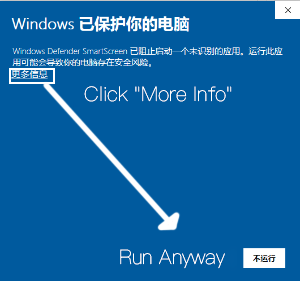
Usage
Q: How do I sign in on a computer?
A: Desktop sign-in currently requires a QR code scan. Install the mobile app and use it to scan the code on your computer.
Q: Why am I not receiving push notifications on Android?
A: Huawei, Xiaomi and Meizu phones are currently supported. Support for other brands is planned. See the setup guide: https://www.rongcloud.cn/docs/android_message_notification.html#question.
Q: Why does Android say “This message is not supported in the current version”?
A: Some features are not yet supported on Android. The message may contain merged forwarded messages or another file type. Open it on your computer to view it.
Q: Which file types can I upload and download?
A: Desktop supports full file operations. Mobile supports downloading, previewing and forwarding Word (.doc, .docx), Excel (.xls, .xlsx), PowerPoint (.pptx, .ppt), PDF (.pdf) and images (BMP, JPG, JPEG, PNG, tif).
Q: What should I do if the workspace shows a blank screen?
A: Your sign-in token may have expired. Sign out and back in. A fix is planned for a future release.
Q: Where can I report a problem?
A: Contact Shi Mengjun or submit feedback in TAL Talk under Me > Feedback.